
Webinar operations overview
Understand how Spacebrain Webinars work, from setup and publishing to event day, replay and results, and find the right guide for each stage.
Spacebrain Webinars handle everything around your event: the registration page, sign-ups, reminders, the attendee pages, optional paid seats, attendance tracking, replays and results. This page explains how the pieces fit together and points you to the right guide for each stage. It's for anyone planning or running a Webinar.
Spacebrain doesn't host the live room
Live sessions run in Zoom or Google Meet. Spacebrain creates the session, sends attendees to it and tracks who attended. Presenting, screen sharing, chat, muting and recording all happen in Zoom or Google Meet.
Where to find Webinars
Open Sites → Webinars. From the list you can:
- Select New webinar to create one.
- Select Settings to connect Video providers (Zoom and Google Meet) and Payment accounts (Stripe and Commas).
- Open a Webinar to see its workspace.
Webinars are a paid feature, so availability depends on your plan.
Three ways to deliver a Webinar
| Format | What you need | What attendees get |
|---|---|---|
| Live webinar | A connected Zoom or Google Meet account | A join button that opens the live room at the right time |
| On-demand recording | A direct link to an .mp4, .webm or .ogg video file | The recording whenever they're eligible to watch |
| Automated recording | The same kind of video link | The recording at a scheduled or just-in-time session |
You choose the format when you create the Webinar, and it can't be changed later.
The Webinar workspace
When you open a Webinar, its workspace groups everything into four areas:
| Group | Tabs | Use it to |
|---|---|---|
| Set up | Overview, Sessions, Schedule, Conversions | See setup and publishing details, manage live rooms and timing, and set up Meta Pixel tracking. |
| People | Registrations, Attendees | See who signed up and who attended. |
| Delivery | Automations, Provider health, Activity | Manage reminders and follow-up, check the video account, and see what happened when. |
| Results | Analytics | Review attendance, conversions and campaign performance. |
Some workspaces also show an AI report tab under Results. It depends on your workspace.
The header has Preview journey, Edit (opens the step-by-step builder), View page once published, Publish or Unpublish, and Archive.
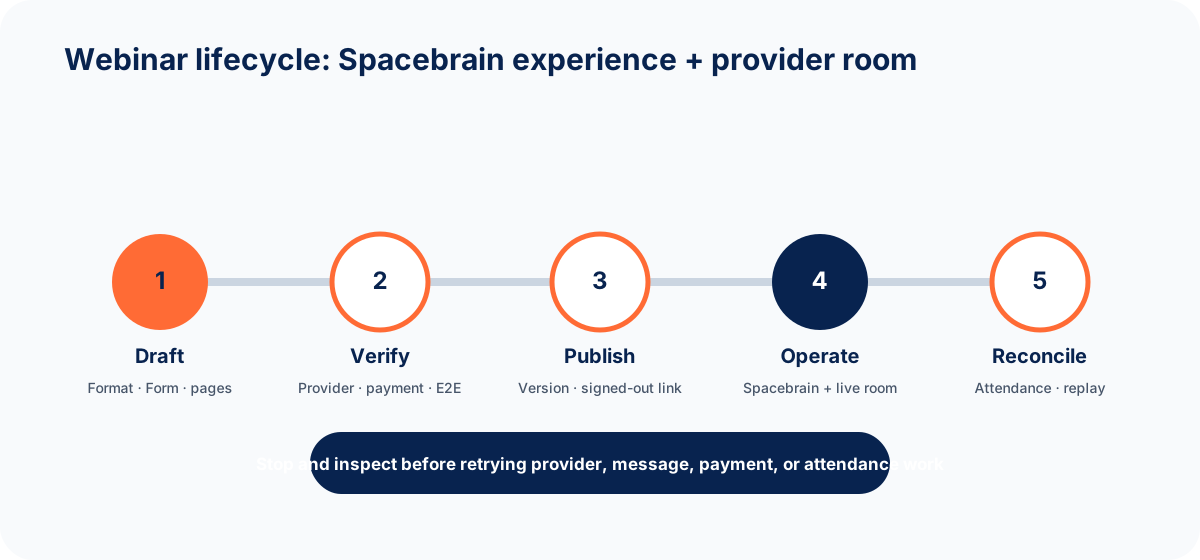
The Webinar lifecycle
- Set up and publish: create the Webinar, connect a published form and your video account, design the pages, schedule sessions, set up messages and payments, rehearse, test and publish.
- Run the event: check the session and video account, host in Zoom or Google Meet, help attendees who can't get in, and reschedule or cancel if needed.
- Follow up and improve: match attendance, set up the replay, review results and message delivery, then unpublish or archive when you're done.
Use the focused guides
Set up, test, and publish
Create the Webinar, connect the form and video account, build the journey, schedule, rehearse and publish.
Run event-day operations
Check everything before you go live, help attendees, and reschedule or cancel safely.
Replay, analytics, and lifecycle
Set up replays, read your results, and unpublish, archive or delete safely.
Track conversions
Send Meta Pixel events when people register or view your offer.
Where to check each answer
| Question | Where to look |
|---|---|
| What version is public? | The published Webinar, opened from View page in a signed-out browser |
| Will the live session work? | Provider health and a rehearsal in Review & launch |
| Is this person registered? | Registrations |
| Has this person paid? | The payment confirmation from Stripe or Commas, not the checkout "thank you" page |
| Did this person attend? | Attendees, after attendance has been matched |
| Can this person watch the replay? | The replay settings and the person's own attendee link |
Good habits
- A builder Preview checks layout only. It doesn't prove checkout, joining, messages or replays work.
- An account showing as connected can still need attention. Check Provider health before each event.
- Rehearsals are safe: they create no registrations, payments, messages or analytics.
- If an action with Zoom or Google Meet might have half-finished, check there before you retry, or you may create duplicates.
- Test with your own details and your payment provider's test mode, never with real customers.
- Never share attendee links, account passwords, payment details or private replay links.
FAQ
Do I need a form to run a Webinar?
Yes. Every Webinar registers people through a published form. Create and publish it in Sites → Forms first.
Can I sell tickets?
Yes. Add an offer in the Offer & payments step and connect Stripe or Commas. See Stripe and Commas.
Can I export a list of attendees?
The Registrations and Attendees tabs let you filter and page through people. See replay, analytics, and lifecycle for reporting options.
Next step
Start with Set up, test, and publish a Webinar. For video accounts, see Zoom and Google Meet.
Next step
Keep moving
Open the relevant Spacebrain screen or contact support if you need help.
Last updated on
Track conversions with Meta Pixel
Add your Meta Pixel to forms, landing pages, funnels, quizzes and webinars, choose which actions count as conversions, and test that events arrive.
Set up, test, and publish a Webinar
Create a Spacebrain Webinar step by step - choose a flow, connect your form and video account, build the attendee journey, schedule sessions, test and publish.